I had some questions regarding Nokia E61i as modem for my Macbook Pro in the past. I have posted how I got that working as a comment on one of the E61i posts (the one about Nokia and Papyrus, I'll dig up the link).
Please, read my comment, and post further questions here!
Btw, I am posting this from my Macbook Pro connected to the 'net over bluetooth and the E61i. So it works!
update: This is the interesting post!
Take care,
Thursday, July 05, 2007

Friday, June 22, 2007
Oqo, where are you...
As I am in Santa Clara, California now, I thought about picking up an Oqo O2 while I am here. Being in the technological center of the world, I supposed that should be possible. Also, since Oqo is San Francisco based, it should be even more possible.
According to the Oqo website, MicroCenter is a retailer for the Oqo, and there happen to be a shop just a couple of blocks away from the hotel I am staying in. So I went to the shop and asked for the Oqo. Unfortunately, they were out. Not even out as in no exemplar for sale, but they even didn't have one on display. The salesperson told me that the Oqo is so popular that they got a list of people waiting for one, and as soon as they get shipments, they call people on the list and the Oqos goes out of the door again. I saved some $2000, which is probably not a bad thing.
I can go buy one on the internet of course, but it is kind of scary buying something I even have not held in my hands. As I have mentioned before, I am happy to this day that I didn't got stuck with the Sony UX50 as it turned out to be horrible in my hands when I finally got to hold it. I think the Oqo O2 is very different, but I have to be sure.
I am visiting Chicago on my way home, maybe I can pick up one there...
Some of you might wonder what's up with the Usenix annual tech conference, as this is where I am right now. I think it is kind of average. Some good talks, some not so good. And nothing special to report like big braking news or anything like that. I got the chance to speak with Guido van Rossum though, which was of course kind of cool for someone like me using Python all the time - I enjoyed that. I have also made some new friends, both from Norway and from USA - which is always good and a main reason for going to conferences. So all in all, it was ok for me to be here. Tomorrow I take off and head east.
Take care!
According to the Oqo website, MicroCenter is a retailer for the Oqo, and there happen to be a shop just a couple of blocks away from the hotel I am staying in. So I went to the shop and asked for the Oqo. Unfortunately, they were out. Not even out as in no exemplar for sale, but they even didn't have one on display. The salesperson told me that the Oqo is so popular that they got a list of people waiting for one, and as soon as they get shipments, they call people on the list and the Oqos goes out of the door again. I saved some $2000, which is probably not a bad thing.
I can go buy one on the internet of course, but it is kind of scary buying something I even have not held in my hands. As I have mentioned before, I am happy to this day that I didn't got stuck with the Sony UX50 as it turned out to be horrible in my hands when I finally got to hold it. I think the Oqo O2 is very different, but I have to be sure.
I am visiting Chicago on my way home, maybe I can pick up one there...
Some of you might wonder what's up with the Usenix annual tech conference, as this is where I am right now. I think it is kind of average. Some good talks, some not so good. And nothing special to report like big braking news or anything like that. I got the chance to speak with Guido van Rossum though, which was of course kind of cool for someone like me using Python all the time - I enjoyed that. I have also made some new friends, both from Norway and from USA - which is always good and a main reason for going to conferences. So all in all, it was ok for me to be here. Tomorrow I take off and head east.
Take care!
Sunday, June 17, 2007
Well done, Apple!
That was it for this year - the WWDC'07 is history. My first post, based on the impressions from the keynote, was a bit harsh in the tone, so I figured I should say a few more words.
First, I must say congratulations to the folks who put together WWDC'07. Just face it folks, they must have had a big problem. All the announcements were done in 2006, probably under the assumption that everything would have been on the streets this year. Which did not happened. Still, they managed to put together an impressive program. While the keynote was a bit bad, and as a side note - I am not the only one who have that opinion; most of the people I spoke to at the event shared my view - the rest of the event was very good. Unfortunately, all the other sessions are under NDA so folks that did not attend will not know much about that. But because our shared opinion was that the keynote was not outstanding, the people at Apple who was responsible for the program and the content and the presentations deserved a big thank you. Many of the presentations was excellent both in content and delivery. And especially in the developer tools sessions we saw and heard a lot of new things. Which we can not talk about of course. But, developers out there, expect cool stuff :)
Hopefully that set the record straight. I still have to just dream about my favorite 10 inch touch-screen macbook pro though, as now new hardware was revealed. We'll see what they can come up with next year.
Now I am off to the more academic Usenix Annual Tech, and can speak freely again! That does not mean that I have something to say, of course. By the way, I can also still play with my Leopard seed dvd which I must say is quite functional :)
Until later, take care!
First, I must say congratulations to the folks who put together WWDC'07. Just face it folks, they must have had a big problem. All the announcements were done in 2006, probably under the assumption that everything would have been on the streets this year. Which did not happened. Still, they managed to put together an impressive program. While the keynote was a bit bad, and as a side note - I am not the only one who have that opinion; most of the people I spoke to at the event shared my view - the rest of the event was very good. Unfortunately, all the other sessions are under NDA so folks that did not attend will not know much about that. But because our shared opinion was that the keynote was not outstanding, the people at Apple who was responsible for the program and the content and the presentations deserved a big thank you. Many of the presentations was excellent both in content and delivery. And especially in the developer tools sessions we saw and heard a lot of new things. Which we can not talk about of course. But, developers out there, expect cool stuff :)
Hopefully that set the record straight. I still have to just dream about my favorite 10 inch touch-screen macbook pro though, as now new hardware was revealed. We'll see what they can come up with next year.
Now I am off to the more academic Usenix Annual Tech, and can speak freely again! That does not mean that I have something to say, of course. By the way, I can also still play with my Leopard seed dvd which I must say is quite functional :)
Until later, take care!
Wednesday, June 13, 2007
Qtpfsgui - new version
Hi guys, Giuseppe have put together a new version of qtpfsgui, and as always, I try to keep up with the version for OSX. As I happen to be at the Apple developer conference, WWDC'07, right now, it's a great time for poking around with this stuff.
So, alas, the 1.8.9 version of qtpfsgui for OSX is out on sourceforge now. Besides that, there is not very much to say, I have not done any special mac-tweaks this time. Check the regular files for general changes.
Again, I do not provide a version with Qt built in, as I have not seen any request for that. Head over to trolltech and get Qt there if you don't have it. I understand that version 4.3 of Qt is out now, but I still put this together with the previous version. I plan to grab the new Qt and check that everything works as it should, but if someone gets ahead of me, please comment on success or failure.
So, alas, the 1.8.9 version of qtpfsgui for OSX is out on sourceforge now. Besides that, there is not very much to say, I have not done any special mac-tweaks this time. Check the regular files for general changes.
Again, I do not provide a version with Qt built in, as I have not seen any request for that. Head over to trolltech and get Qt there if you don't have it. I understand that version 4.3 of Qt is out now, but I still put this together with the previous version. I plan to grab the new Qt and check that everything works as it should, but if someone gets ahead of me, please comment on success or failure.
Monday, June 11, 2007
The WWDC'07 keynote
This years WWDC'07 keynote is history. As always it was delivered by Steve Jobs. I have to say it was a mediocre event. The presentation was smooth enough, but Steve seems to be a bit uninspired. And with good reasons, as much of what was delivered was just a repetition of what we heard last year. No new hardware was presented, the shipping date for the "Leopard" is still october and the iPhone is not out yet.
The only new things really was that there will be a new desktop and a new finder (the file browser and management thing in OSX). Not a very big deal, mostly graphics tweaks that people like myself tend to avoid anyway. There was quite a few animated demos on stage, but notting to brag about to be honest. Sure, Leopard will be great and everything, don't get me wrong. But we know most of it already!
There was also announced that EA and id will have more games on OSX in the future, which I guess is great for people who avoid apple due to limited gaming support. And then Apple will start pushing browser to windows users, but I don't care much about that either as I use firefox anyway. It might be good for IE users, though. And it is supposed to be fast, too.
There has been some discussions on iPhone and development tools. This was but was not presented, too. What apple had to say on this is that iPhone will have a full safari engine inside, so people can do web2.0/ajax style applications that can be used on the iPhone. Which is a no-solution solution. It was not mentioned whether such applications can be downloaded and installed or have to be run from a webserver all the time. It was mentioned that such applications should get access to the phone and network services of the iPhone, but nothing specific was presented. I think this was another mediocre part of the presentation. Maybe good enough for some, but certainly not what most developers had in mind when they asked for development tools. It remains to be seen if Apple is right on this one.
What else is there to say? A large crowd was gathered as usual, more than 5000 persons we was told. And apple did the usual but very annoying marketing trick of lining people out before we could get in - had to stand in line for quite a long time. Now, I'm usually not the line-standing kind of guy, but I am still somewhat on the Norwegian timezone as I flew over only yesterday, and couldn't get much sleep after 5:30 in the morning anyway. So I get out of bed, had a shower, went to a breakfast place which was quite nice - Cafe Venue, I'll post the address later on if someone care. And then I went down to Moscone convention center. There I found a long, long, long queue of people waiting to get in. Which is only marketing of course. It was 7:30 in the morning, and a couple hundred people waited to get in as this was a rock concert or something. There where rumours around that someone was getting into the line 3 in the morning. That is simply a freakshow.
So, Apple, I have this suggestion for you for next year. If you don't have anything more to give us than we got this year. Please, just open the doors and let people walk in and get a seat, just as we usually do. No need to be so annoyingly special all the time.
Ok, that's it for now - I'm off to more presentations. While the keynote wasn't that good, I hope the other presentations will be. At least, the rest of the week will have more technical content delivered by engineers. I'm looking forward to that.
Take care!
The only new things really was that there will be a new desktop and a new finder (the file browser and management thing in OSX). Not a very big deal, mostly graphics tweaks that people like myself tend to avoid anyway. There was quite a few animated demos on stage, but notting to brag about to be honest. Sure, Leopard will be great and everything, don't get me wrong. But we know most of it already!
There was also announced that EA and id will have more games on OSX in the future, which I guess is great for people who avoid apple due to limited gaming support. And then Apple will start pushing browser to windows users, but I don't care much about that either as I use firefox anyway. It might be good for IE users, though. And it is supposed to be fast, too.
There has been some discussions on iPhone and development tools. This was but was not presented, too. What apple had to say on this is that iPhone will have a full safari engine inside, so people can do web2.0/ajax style applications that can be used on the iPhone. Which is a no-solution solution. It was not mentioned whether such applications can be downloaded and installed or have to be run from a webserver all the time. It was mentioned that such applications should get access to the phone and network services of the iPhone, but nothing specific was presented. I think this was another mediocre part of the presentation. Maybe good enough for some, but certainly not what most developers had in mind when they asked for development tools. It remains to be seen if Apple is right on this one.
What else is there to say? A large crowd was gathered as usual, more than 5000 persons we was told. And apple did the usual but very annoying marketing trick of lining people out before we could get in - had to stand in line for quite a long time. Now, I'm usually not the line-standing kind of guy, but I am still somewhat on the Norwegian timezone as I flew over only yesterday, and couldn't get much sleep after 5:30 in the morning anyway. So I get out of bed, had a shower, went to a breakfast place which was quite nice - Cafe Venue, I'll post the address later on if someone care. And then I went down to Moscone convention center. There I found a long, long, long queue of people waiting to get in. Which is only marketing of course. It was 7:30 in the morning, and a couple hundred people waited to get in as this was a rock concert or something. There where rumours around that someone was getting into the line 3 in the morning. That is simply a freakshow.
So, Apple, I have this suggestion for you for next year. If you don't have anything more to give us than we got this year. Please, just open the doors and let people walk in and get a seat, just as we usually do. No need to be so annoyingly special all the time.
Ok, that's it for now - I'm off to more presentations. While the keynote wasn't that good, I hope the other presentations will be. At least, the rest of the week will have more technical content delivered by engineers. I'm looking forward to that.
Take care!
Travelling from home to SF
As I told you already, I have left safe home for San Francisco, CA, USA, and
the WWDC'07 as well as USENIX Annual Tech in Santa Clara. Leaving home was easy
enough, as my wife drove me to the central train station in Oslo. After kissing
wife and kids godby, I entered the airport express train.
The train starts rolling, but after a few hundred meters it wants a rest. Power
is out, the crew announces. Now, this was easily fixed and after a few minutes
we are rolling again. Nevertheless, I got the feeling that this travel wasn't
supposed to be like every other travel from home to US I have done in the past.
After some 20 minutes on the train, I arrived at the airport and mentally
prepare my self for endless queus, as I assumes I have to check in at the
counter. But, hey man, turns out I can do self service check-in even when going
as far as US. Great! After a quick visit to the check-in station I am all set.
Only that the machine was out of baggage identifying tapes or what you call
them. So, that was unusual event no. 2. I was lucky bumping into some helpful
guy that fixed the baggage for me and after a line with only three others, I
was all set.
Security check at Oslo airport Gardermoen has improved a lot recently. There
was almost no queue at all and I passed through in a matter of five minutes. At
this stage I am impressed and forget all my concerns about the unusual travel.
But it is not supposed to last. Next thing coming up is a delay. The flight to
London Heatrow is 35 minutes late. There should still be enough time for the
transit at Heatrow, but we better be in the air after those 35 minutes. And we
are - the pilot even manage to get some extra speed out of the stylish Boeing
737 so we are only about 20 minutes late when we arrive at the airport of every
nightmare, London "Nightmare" Heatrow.
Everything looks just fine when we enter the terminal, but after following the
"flight connections" sign for a few minutes, I see a looong queue in front of
me. I assume that queue is something not concering me and walk by on the side.
To be sure, though, I show my ticket to some airport person and ask where to
go. You guessed it right - back at the end of that queue is where I belong. So
I line up, check the time, and start moving very slowly. Wondering why there is
such a queue - must be something unusual I think, stupid me. Clock is ticking,
I should be at the gate 13:30 and when it passed 13:00 I know for sure that I
will have to run thorugh the terminal. It's the security check of course. Don't
get me wrong, I have nothing against the security checks, I am all for safety
on board. But here they obviously squeeze everyone just using Heatrow for
connecting one international flight with another thorugh I bottle neck of only
four scanners. That is way to little. So all the hundreds of people have to
line up, sweat, become warm and angry and mad and every other silly thing. Not
me, of course, I just observe the madness. Still, I may have one or two thing
to say to the managere of "Nightmare" Heatrow. This does not cut it at all. I
hope they have something in the works. For the record, I will say to everyone:
Avoid Nightmare-Heatrow for connections if you can!
After finally getting through the checkpoint, I am a bit behind schedule as
clock has ticked passed 13:30. I start walking as fast as I can, looking for
places to check gate information and try figuring out in my head which flight I
am supposed to be on. "Flight is closing" blinks on the screens behind UA931 to
San Francisco. I walk faster and almost run and find gate 27 in terminal 3 and
it's still open. Turns out that flight is delayed to. So, thats probably
unusual thing no. 3 - only this turnes out to be helpful! I get on the plane
and stay there for 11 hours. Nothing particular interesting to say about that!
And with that I have had my share. I was prepared for a similarily long queue
at the US border check, but apparently there was mostly US citizens arriving at
this time, as there was only a very few persons in line at the non-us visitors
counters. My bag appear on the belt rather quick, and after a quick ride on the
BART metro system, I arrive at the hotel. Next thing is checking in at the
event, but that will be for another post.
Take care!
the WWDC'07 as well as USENIX Annual Tech in Santa Clara. Leaving home was easy
enough, as my wife drove me to the central train station in Oslo. After kissing
wife and kids godby, I entered the airport express train.
The train starts rolling, but after a few hundred meters it wants a rest. Power
is out, the crew announces. Now, this was easily fixed and after a few minutes
we are rolling again. Nevertheless, I got the feeling that this travel wasn't
supposed to be like every other travel from home to US I have done in the past.
After some 20 minutes on the train, I arrived at the airport and mentally
prepare my self for endless queus, as I assumes I have to check in at the
counter. But, hey man, turns out I can do self service check-in even when going
as far as US. Great! After a quick visit to the check-in station I am all set.
Only that the machine was out of baggage identifying tapes or what you call
them. So, that was unusual event no. 2. I was lucky bumping into some helpful
guy that fixed the baggage for me and after a line with only three others, I
was all set.
Security check at Oslo airport Gardermoen has improved a lot recently. There
was almost no queue at all and I passed through in a matter of five minutes. At
this stage I am impressed and forget all my concerns about the unusual travel.
But it is not supposed to last. Next thing coming up is a delay. The flight to
London Heatrow is 35 minutes late. There should still be enough time for the
transit at Heatrow, but we better be in the air after those 35 minutes. And we
are - the pilot even manage to get some extra speed out of the stylish Boeing
737 so we are only about 20 minutes late when we arrive at the airport of every
nightmare, London "Nightmare" Heatrow.
Everything looks just fine when we enter the terminal, but after following the
"flight connections" sign for a few minutes, I see a looong queue in front of
me. I assume that queue is something not concering me and walk by on the side.
To be sure, though, I show my ticket to some airport person and ask where to
go. You guessed it right - back at the end of that queue is where I belong. So
I line up, check the time, and start moving very slowly. Wondering why there is
such a queue - must be something unusual I think, stupid me. Clock is ticking,
I should be at the gate 13:30 and when it passed 13:00 I know for sure that I
will have to run thorugh the terminal. It's the security check of course. Don't
get me wrong, I have nothing against the security checks, I am all for safety
on board. But here they obviously squeeze everyone just using Heatrow for
connecting one international flight with another thorugh I bottle neck of only
four scanners. That is way to little. So all the hundreds of people have to
line up, sweat, become warm and angry and mad and every other silly thing. Not
me, of course, I just observe the madness. Still, I may have one or two thing
to say to the managere of "Nightmare" Heatrow. This does not cut it at all. I
hope they have something in the works. For the record, I will say to everyone:
Avoid Nightmare-Heatrow for connections if you can!
After finally getting through the checkpoint, I am a bit behind schedule as
clock has ticked passed 13:30. I start walking as fast as I can, looking for
places to check gate information and try figuring out in my head which flight I
am supposed to be on. "Flight is closing" blinks on the screens behind UA931 to
San Francisco. I walk faster and almost run and find gate 27 in terminal 3 and
it's still open. Turns out that flight is delayed to. So, thats probably
unusual thing no. 3 - only this turnes out to be helpful! I get on the plane
and stay there for 11 hours. Nothing particular interesting to say about that!
And with that I have had my share. I was prepared for a similarily long queue
at the US border check, but apparently there was mostly US citizens arriving at
this time, as there was only a very few persons in line at the non-us visitors
counters. My bag appear on the belt rather quick, and after a quick ride on the
BART metro system, I arrive at the hotel. Next thing is checking in at the
event, but that will be for another post.
Take care!
Sunday, June 10, 2007
On my way to WWDC
I am taking off to WWDC right now - I'm looking forward to see what
this year will bring to the table; will some of mine or the numerous
others expectations out ther be met? Will it be good?
this year will bring to the table; will some of mine or the numerous
others expectations out ther be met? Will it be good?
I will do some reporting here, if you have questions, please don't
hesitate to use the comment function! And to all of you that will also
be there, hope we can get in touch :)
Sunday, June 03, 2007
Nokia E61i and Papyrus
Hi, I got some questions about the E61i and Papyrus. To be more exact, the question was if it was possible to see detailed notes on tasks and events. Today I have downloaded and installed a trial version of Papyrus for Symbian S60, v.9.1. The version of Papyrus I have installed is 1.2.13, as the latest version, 1.2.14, use some funny language when used on my E61i with Norwegian menus.
I can at least confirm that the longer notes does show up when Papyrus is used. So you guys out there who want the notes and like to use Papyrus - you can go ahead and make the purchase.
Besides that, thanks for the tip about Papyrus. It looks some much nicer than the default calendar application! I guess I have to buy it in order to test it as default calendar application (now, I have to open it each time I want to look at it). Comments are appreciated on that.
Take care,
I can at least confirm that the longer notes does show up when Papyrus is used. So you guys out there who want the notes and like to use Papyrus - you can go ahead and make the purchase.
Besides that, thanks for the tip about Papyrus. It looks some much nicer than the default calendar application! I guess I have to buy it in order to test it as default calendar application (now, I have to open it each time I want to look at it). Comments are appreciated on that.
Take care,
Friday, June 01, 2007
More on FoneLink and phones
A couple of days ago, I raved about the FoneLink program from novamedia, a very slick program for transferring information between my nokia E61i and a OSX machine. After a few more days of use, I realize that iSync still has its niche - the everyday simple syncing is probably better than with iSync. Bur for transferring documents, sounds, pictures, and in general organizing the content on the phone, FoneLink is better.
After blogging about FoneLink here, I got in touch with novamedia. I obtained a bit more information from them about a few issues that I and maybe someone else wonders about.
First, the note or description on events and todos. The reason this does not appear on the E61i and similar phones is that it is not supported by the default calendar app from Nokia. We can beg Nokia to fix this, or we can maybe use something else like papyrus (which I still have not got around to evaluate). At least, FoneLink can not solve this problem.
Further, I had to more questions for the FoneLink guys. As most of you know, the smartphones from SonyEricsson has really terrible support on OSX. So my follow-up to novamedia was whether support for the smartphones (like M600i , P1 and so on) from SonyEricsson was planned. On this question I was told that it is in the works, and probably available in about 3 months time. That will be really great - maybe I can go back to my favorite smartphone :)
My other question was about combining usb and bluetooth for syncing a device with FoneLink. Usually, you just want to connect with bluetooth for the everyday syncing, but from time to time you have larger amount of data you need to transfer. Today, a device in FoneLink is a combination of the device and the connection, so my E61i over bluetooth and the same E61i over usb is two different things. This mean that I can not choose the connection to use dependent on the amount of data I need to transfer. Now, there are ways around this but it will be rather neat if it get supported out of the box. I was told that novamedia is working on this, although I did not get an estimate on when we can expect this to be available.
So much about FoneLink and the great guys at Nova Media doing this fine application.
I have another problem with my E61i - predictive text. With all the smartphones I have had the last years, I have been able to start typing a word and the application I use, whether it is email, sms, or some other text, will suggest matching words from the dictionary. This is something I just expect to be in place, so I didn't gave it a thought at all when buying the E61i. After fiddling with settings and buttons quite a few hours, and reading manuals as well, I went to google. Just to find out that there are no predictive text support on this phone. Some claim in formus and the like that you don't need this on a phone with qwerty keyboard. But they are plain wrong. The M600i from Sony Ericsson for instance, have this - and a full keyboard, and I wrote messages much faster and more comfortable on that one than I do on the E61i.
So if someone hear me - please!
And while I wait for the perfect device, I note that every small device has it strengths and weaknesses. Maybe the manufacturers do this to have people like me hunt for the perfect all the time. I have been on the search for 10 years now, and I am still searching.
For a few days my plan was to replace the Fujitsu Siemens P1510d I am writing this on with the Oqo O2. But now I read online that there seems to be some quality problems with the oqo, which gives me some doubts. The most recent device seems to be the Everun from Raon. In addition there is the new Q1 ultra umpc from Samsung which seems to be interesting, as well as the Fujitsu U8240. I doubt any of these are the perfect device, but maybe close enough that I am willing to give them a try... The big question is of course how well they can run Linux, as I am allergic to bad operating systems.
Take care, folks!
After blogging about FoneLink here, I got in touch with novamedia. I obtained a bit more information from them about a few issues that I and maybe someone else wonders about.
First, the note or description on events and todos. The reason this does not appear on the E61i and similar phones is that it is not supported by the default calendar app from Nokia. We can beg Nokia to fix this, or we can maybe use something else like papyrus (which I still have not got around to evaluate). At least, FoneLink can not solve this problem.
Further, I had to more questions for the FoneLink guys. As most of you know, the smartphones from SonyEricsson has really terrible support on OSX. So my follow-up to novamedia was whether support for the smartphones (like M600i , P1 and so on) from SonyEricsson was planned. On this question I was told that it is in the works, and probably available in about 3 months time. That will be really great - maybe I can go back to my favorite smartphone :)
My other question was about combining usb and bluetooth for syncing a device with FoneLink. Usually, you just want to connect with bluetooth for the everyday syncing, but from time to time you have larger amount of data you need to transfer. Today, a device in FoneLink is a combination of the device and the connection, so my E61i over bluetooth and the same E61i over usb is two different things. This mean that I can not choose the connection to use dependent on the amount of data I need to transfer. Now, there are ways around this but it will be rather neat if it get supported out of the box. I was told that novamedia is working on this, although I did not get an estimate on when we can expect this to be available.
So much about FoneLink and the great guys at Nova Media doing this fine application.
I have another problem with my E61i - predictive text. With all the smartphones I have had the last years, I have been able to start typing a word and the application I use, whether it is email, sms, or some other text, will suggest matching words from the dictionary. This is something I just expect to be in place, so I didn't gave it a thought at all when buying the E61i. After fiddling with settings and buttons quite a few hours, and reading manuals as well, I went to google. Just to find out that there are no predictive text support on this phone. Some claim in formus and the like that you don't need this on a phone with qwerty keyboard. But they are plain wrong. The M600i from Sony Ericsson for instance, have this - and a full keyboard, and I wrote messages much faster and more comfortable on that one than I do on the E61i.
So if someone hear me - please!
And while I wait for the perfect device, I note that every small device has it strengths and weaknesses. Maybe the manufacturers do this to have people like me hunt for the perfect all the time. I have been on the search for 10 years now, and I am still searching.
For a few days my plan was to replace the Fujitsu Siemens P1510d I am writing this on with the Oqo O2. But now I read online that there seems to be some quality problems with the oqo, which gives me some doubts. The most recent device seems to be the Everun from Raon. In addition there is the new Q1 ultra umpc from Samsung which seems to be interesting, as well as the Fujitsu U8240. I doubt any of these are the perfect device, but maybe close enough that I am willing to give them a try... The big question is of course how well they can run Linux, as I am allergic to bad operating systems.
Take care, folks!
Thursday, May 31, 2007
Nokia E61i and FoneLink
Today, there was a post on JKonTheRun about a product named FoneLink. This is supposed to be a better piece of software for syncing information between a Mac and a Symbian S60 based phone.
As I have both a Mac (actually, a couple of them) and the Nokia E61i, I wanted to give it a run. I grabed the demo version at the webpage. Installation was OSX-smooth as usual, and then I launched the application. And, man, this was a smooth experience. It quickly figured out which was the relevant phone among my bluetooth connections, and started collecting information after my confirmation that this was the right device to collect from. It went stright away making a backup of all the information in the phone, but it is also possible to put the backup procedure into the background to perform other tasks at the same time.
I just mess around in the application for a while. This works really smooth, and seems to be so much nicer than the iSync. If I can get this to sync my Mac and the Phone regularly whenever those are close to each other bluetooth-wise, I think this is a keeper.
For those who like to know such things - the notes in events and todos does not seems to be synced over to the phone with this application either. Have to look more carefully into that (and have not got around to test papyrus yet, as suggested in comments here).
This was just a short notice, I have to go to bed now. More on FoneLink if I buy it!
As I have both a Mac (actually, a couple of them) and the Nokia E61i, I wanted to give it a run. I grabed the demo version at the webpage. Installation was OSX-smooth as usual, and then I launched the application. And, man, this was a smooth experience. It quickly figured out which was the relevant phone among my bluetooth connections, and started collecting information after my confirmation that this was the right device to collect from. It went stright away making a backup of all the information in the phone, but it is also possible to put the backup procedure into the background to perform other tasks at the same time.
I just mess around in the application for a while. This works really smooth, and seems to be so much nicer than the iSync. If I can get this to sync my Mac and the Phone regularly whenever those are close to each other bluetooth-wise, I think this is a keeper.
For those who like to know such things - the notes in events and todos does not seems to be synced over to the phone with this application either. Have to look more carefully into that (and have not got around to test papyrus yet, as suggested in comments here).
This was just a short notice, I have to go to bed now. More on FoneLink if I buy it!
Thursday, May 24, 2007
Notes on Nokia E61i
A few weeks ago I switched smartphone. The last 6 months I have used the HTC TyTN on a daily basis, and was satisfied with the hardware although I of course have a hard time with the operating system. As I already have written up something on the HTC, I don't want to go into any detail on that. But as you already know, I switched to the Nokia E61i, running the 3rd generation of the S60 system - a old and well proven operating system, but still new to me.
Let us start with the conclusions! The e61i is a solid phone, with a solid operating system. So far I have had to reboot the phone just a couple of times to fix problems with some applications, but not by taking out the battery as I had to do each other day with the TyTN; only third-party applications was locked up and the phone was still functional. So reboot have only been a convenience thing. Other things on the positive side is good messaging functionality, easy access to, and well-functioning wifi system, and great selection of software due to the S60 system. So all in all I am satisfied, and will probably keep it for a while. But read on, there are quite a few things on the negative side as well. For instance, the camera is totally crap.
In the past I have used Windows mobile 5, Sony Ericssons Symbian/UIQ (P800i and M600i), as well as the more regular Sony Ericsson system. While these systems are quite different, the Symbian S60 can be compared to the first two. It is obvious that the S60 have been around for a while, with a lot more bugs nailed out. It feels more solid. Maybe not super-fast all the time, but it does the job. On the negative side, though, there are often too many steps to go through to complete an action. If I want to send an SMS, for instance, I have to go through 5 steps (depending on how you count) on the S60, while on the Sony Ericsson UIQ there are only about 3 steps if you want to send to someone you send to regularly. I haven't done a scientific comparison as I should as a researcher, but in general I feel I have to use more time to perform the same action on the S60 compared to the other two.
On the positive side, you can't get past the large selection of software available for the S60. Maybe comparable to WM5, and far more than what's available for the UIQ. The putty ssh-client is very usable. I also use Fring for Skype/MSN/GTalk and the Gmail application. All work very well. Also, S60 is generally better supported when it comes to sync/desktop access than the other two. While the situation in general is good for all the systems if you use Windows on your computer, the S60 is far better if you are either a linux or osx user like me.
The E61i is light, and it is slim. While the form factor is a bit unusual, it is easy to carry around either in a shirt pocket or in your jacket. I even stick it in the back of my jeans if I have to. But generally I carry it in a Krusell pouch with a belt-clip. As the weight is so low, I hardly recognize it's there.
The display is very good. It's bright in almost any light condition and have better colors than I have had on any phone in the past (and as you know, I have tested quite a few...). While the resolution is not extremely high considering the size of the screen, I have find it to be sufficient for all my needs.
When it comes to the keys, I have to say they are good. The feedback is nice - when I type messages I rarely mistype. As there are many keys on the phone, there are also room for a few shortcuts which helps out with problem I have with to many steps to perform certain actions in the S60 system. But, there is a big downside for me here. It is not comfortable typing on the phone. While the phone is wide for a phone, it is still to small to hold and thumbtype comfortable with my not so very big hands. The TyTN have the keyboard as a slide-out in "landscape" orientation. Hence the keyboard is wider, and much more comfortable. My hands starts aching even when I type moderate sized emails on the E61i, so I rarly do that. Still, if I have to type a message, the system is very capable, and works all the time. So compared to the other smartphones I have used, I have to rate this above them.
I will make the story on the camera supplied in this phone very short. Nokia had some left overs on the shelf. They put it into the E61i. Period. It's too crappy. To be honest, though, I am not sure whether it is the camera it self, or the totally crappy, horrible post processing done in the phone after a picture is captured. It seems that they sharpen every image beyond any reasonable imagination, and bump the saturation as well. Does not look good at all.
The Nokia E61i is equipped with Wifi, Bluetooth, 3G/UMTS, Edge, gprs. A lot of connectivity. From time to time I am not sure which one of these is being used. Probably this is just some details in the S60 symbian system I have to figure out. An example: I open the E-mail application, and connect to my IMAP account on wireless lan in my house. I leave this running in the background, and open the webbrowser to check something. In this case I have recognized that the webbrowser from time to time use either the UMTS or the Edge connection instead of the wifi, althought wifi is already connected. I can not explain what is going on, and whether the fault is mine or Nokias. Maybe I am even mistaken... At least, there are things to be sorted out here.
The conclusion was already given above, so I stop here.
In other news, I have start looking for a replacement for my Fujitsu Siemens P1510 (which I write this on). I am looking at either the oqo O2, or some of the newer UMPCs. Fujitsu Siemens is also out with a small thingy. But I'm not in a hurry on this.
Also, I will travel to WWDC'07 and then USENIX'07 (in San Francisco and Santa Clara, respectively) in mid-june. If someone want to meet up and discuss Qtpfsgui on Mac, small devices, have a flickr-meetup, or something else - please drop me a comment!
Take care.
Let us start with the conclusions! The e61i is a solid phone, with a solid operating system. So far I have had to reboot the phone just a couple of times to fix problems with some applications, but not by taking out the battery as I had to do each other day with the TyTN; only third-party applications was locked up and the phone was still functional. So reboot have only been a convenience thing. Other things on the positive side is good messaging functionality, easy access to, and well-functioning wifi system, and great selection of software due to the S60 system. So all in all I am satisfied, and will probably keep it for a while. But read on, there are quite a few things on the negative side as well. For instance, the camera is totally crap.
The S60 system
In the past I have used Windows mobile 5, Sony Ericssons Symbian/UIQ (P800i and M600i), as well as the more regular Sony Ericsson system. While these systems are quite different, the Symbian S60 can be compared to the first two. It is obvious that the S60 have been around for a while, with a lot more bugs nailed out. It feels more solid. Maybe not super-fast all the time, but it does the job. On the negative side, though, there are often too many steps to go through to complete an action. If I want to send an SMS, for instance, I have to go through 5 steps (depending on how you count) on the S60, while on the Sony Ericsson UIQ there are only about 3 steps if you want to send to someone you send to regularly. I haven't done a scientific comparison as I should as a researcher, but in general I feel I have to use more time to perform the same action on the S60 compared to the other two.
On the positive side, you can't get past the large selection of software available for the S60. Maybe comparable to WM5, and far more than what's available for the UIQ. The putty ssh-client is very usable. I also use Fring for Skype/MSN/GTalk and the Gmail application. All work very well. Also, S60 is generally better supported when it comes to sync/desktop access than the other two. While the situation in general is good for all the systems if you use Windows on your computer, the S60 is far better if you are either a linux or osx user like me.
The E61i hardware
The E61i is light, and it is slim. While the form factor is a bit unusual, it is easy to carry around either in a shirt pocket or in your jacket. I even stick it in the back of my jeans if I have to. But generally I carry it in a Krusell pouch with a belt-clip. As the weight is so low, I hardly recognize it's there.
The display is very good. It's bright in almost any light condition and have better colors than I have had on any phone in the past (and as you know, I have tested quite a few...). While the resolution is not extremely high considering the size of the screen, I have find it to be sufficient for all my needs.
When it comes to the keys, I have to say they are good. The feedback is nice - when I type messages I rarely mistype. As there are many keys on the phone, there are also room for a few shortcuts which helps out with problem I have with to many steps to perform certain actions in the S60 system. But, there is a big downside for me here. It is not comfortable typing on the phone. While the phone is wide for a phone, it is still to small to hold and thumbtype comfortable with my not so very big hands. The TyTN have the keyboard as a slide-out in "landscape" orientation. Hence the keyboard is wider, and much more comfortable. My hands starts aching even when I type moderate sized emails on the E61i, so I rarly do that. Still, if I have to type a message, the system is very capable, and works all the time. So compared to the other smartphones I have used, I have to rate this above them.
I will make the story on the camera supplied in this phone very short. Nokia had some left overs on the shelf. They put it into the E61i. Period. It's too crappy. To be honest, though, I am not sure whether it is the camera it self, or the totally crappy, horrible post processing done in the phone after a picture is captured. It seems that they sharpen every image beyond any reasonable imagination, and bump the saturation as well. Does not look good at all.
Other thoughts
The Nokia E61i is equipped with Wifi, Bluetooth, 3G/UMTS, Edge, gprs. A lot of connectivity. From time to time I am not sure which one of these is being used. Probably this is just some details in the S60 symbian system I have to figure out. An example: I open the E-mail application, and connect to my IMAP account on wireless lan in my house. I leave this running in the background, and open the webbrowser to check something. In this case I have recognized that the webbrowser from time to time use either the UMTS or the Edge connection instead of the wifi, althought wifi is already connected. I can not explain what is going on, and whether the fault is mine or Nokias. Maybe I am even mistaken... At least, there are things to be sorted out here.
The conclusion was already given above, so I stop here.
In other news, I have start looking for a replacement for my Fujitsu Siemens P1510 (which I write this on). I am looking at either the oqo O2, or some of the newer UMPCs. Fujitsu Siemens is also out with a small thingy. But I'm not in a hurry on this.
Also, I will travel to WWDC'07 and then USENIX'07 (in San Francisco and Santa Clara, respectively) in mid-june. If someone want to meet up and discuss Qtpfsgui on Mac, small devices, have a flickr-meetup, or something else - please drop me a comment!
Take care.
Sunday, May 20, 2007
New version of qtpfsgui!
Hi folks, it's been a while. I haven't had to much intersting to blog about lately. I have been busy doing other things instead, like cutting down trees in my garden, compiling software, chopping trees, fixing brakes on my car, more garden stuff, on so on... Anyway:
The 1.8.8 version of qtpfsgui for Mac is out, and I have compiled a version for Mac tonight. You get it in the regular place, our at sourceforge. New with this version on OSX is that the Documentation from the Help menu in the program should work, even if you put the application bundle somewhere else than in /Applications. Giuseppe is also working on internationalization, and I have tried to get this to work on OSX as well. How sucessfully that attempt is remains to be seen. I work on Norwegian translation, by the way, but that is far from finialized.
The last few releases, I have created a package which includes the necessary Qt libs. I have not got any feedback on this, and I really do not know if it is of any use to anybody. I can continue preparing that kind of image, but I don't see the point spending that extra time if no one use it. So, the release I have created this time requires that you already have Qt installed, or that you head our to Trolltech, and grab the Qt libs there. If you want me to continue creating the image with qtpfsgui and Qt bundled, please tell me to do so!
Please, go to sourceforge and grab the new qtpfsgui!
Take care!
The 1.8.8 version of qtpfsgui for Mac is out, and I have compiled a version for Mac tonight. You get it in the regular place, our at sourceforge. New with this version on OSX is that the Documentation from the Help menu in the program should work, even if you put the application bundle somewhere else than in /Applications. Giuseppe is also working on internationalization, and I have tried to get this to work on OSX as well. How sucessfully that attempt is remains to be seen. I work on Norwegian translation, by the way, but that is far from finialized.
The last few releases, I have created a package which includes the necessary Qt libs. I have not got any feedback on this, and I really do not know if it is of any use to anybody. I can continue preparing that kind of image, but I don't see the point spending that extra time if no one use it. So, the release I have created this time requires that you already have Qt installed, or that you head our to Trolltech, and grab the Qt libs there. If you want me to continue creating the image with qtpfsgui and Qt bundled, please tell me to do so!
Please, go to sourceforge and grab the new qtpfsgui!
Take care!
Wednesday, May 09, 2007
Nice to know - MacOSX
The print subsytem on MacOSX is simply CUPS!
For a long time I have had one simply, but nagging issue with my Mac computers - printing from the command line. But it hasn't bothered my enough to actually solve the problem. Today, however, one of our Mac converts (or at least wannabies) entered my office with the intention of insulting the Mac. He started like "I want to run acroread from the command line," remember, his background is Linux. No problem I said, you just use open -a AdobeReader.app. No, no, he goes, I just want to process some PDFs into postscript. Why do you want to do that - the Mac handle pdf quite well? And the reason was that, because we didn't knew how to print from the command line, he send jobs to printers through a Linux server. And the Linux server needs postscript.
Aha, great opportunity to solve the cli printing issue. Now, I know of course that lpr is available. Problem is, though, that if I use that from the commandline, I don't know what the names of the printers are supposed to be - the argument to the -P option. And by default, the printing system thinks everything should go to the printer in Letter format, which does not work very well with our European printers. They want A4. And I know how to change paper size to A4 in the GUI, but this will not be the default anyway. At least not when you print with lpr from the command line, should you be lucky enough to hit the right printer.
I have heard some whispering about the print subsystem just beeing cups in the past. So I just gave it a shoot, typing in http://localhost:631 in my browser. And I just goes wow, wow, wow. Because what I see is just the regular, no-frills, cups admin system. With all the printers listed. And selecting "configure printer", I have the option of changing default paper size. I can even see the names of the printer queues. So, selecting one I like to use, changing the paper size, and then try out lpr -Pprinter file.pdf, and run off to the printer. And what do I see? The file.pdf appears as it should, on A4 paper and everything is just fine.
After clicking around in the cups admin system for a few more minutes, I had the printer I like to use most set as default and the paper size set to A4 for the most important once. I also figured out that I can do a grep on the file /etc/cups/printers.conf to get the list of available printers. Looking at the names, it is quite easy to figure out the mapping from printer to queue name. The grep commando I use is this one:
Hope this of some interest to someone out there in the void!
Take care,
For a long time I have had one simply, but nagging issue with my Mac computers - printing from the command line. But it hasn't bothered my enough to actually solve the problem. Today, however, one of our Mac converts (or at least wannabies) entered my office with the intention of insulting the Mac. He started like "I want to run acroread from the command line," remember, his background is Linux. No problem I said, you just use open -a AdobeReader.app. No, no, he goes, I just want to process some PDFs into postscript. Why do you want to do that - the Mac handle pdf quite well? And the reason was that, because we didn't knew how to print from the command line, he send jobs to printers through a Linux server. And the Linux server needs postscript.
Aha, great opportunity to solve the cli printing issue. Now, I know of course that lpr is available. Problem is, though, that if I use that from the commandline, I don't know what the names of the printers are supposed to be - the argument to the -P option. And by default, the printing system thinks everything should go to the printer in Letter format, which does not work very well with our European printers. They want A4. And I know how to change paper size to A4 in the GUI, but this will not be the default anyway. At least not when you print with lpr from the command line, should you be lucky enough to hit the right printer.
I have heard some whispering about the print subsystem just beeing cups in the past. So I just gave it a shoot, typing in http://localhost:631 in my browser. And I just goes wow, wow, wow. Because what I see is just the regular, no-frills, cups admin system. With all the printers listed. And selecting "configure printer", I have the option of changing default paper size. I can even see the names of the printer queues. So, selecting one I like to use, changing the paper size, and then try out lpr -Pprinter file.pdf, and run off to the printer. And what do I see? The file.pdf appears as it should, on A4 paper and everything is just fine.
After clicking around in the cups admin system for a few more minutes, I had the printer I like to use most set as default and the paper size set to A4 for the most important once. I also figured out that I can do a grep on the file /etc/cups/printers.conf to get the list of available printers. Looking at the names, it is quite easy to figure out the mapping from printer to queue name. The grep commando I use is this one:
sudo grep "<Printer" /etc/cups/printers.conf | awk "{print \$2}" | sed "s/>$//"
Hope this of some interest to someone out there in the void!
Take care,
Monday, May 07, 2007
Qtpfsgui 1.8.7
I have uploaded a couple of new dmg's of qtpfsgui, v. 1.8.7, to sourceforge now. The one named qtpfsgui.1.8.7.dmg contains only the program itself with core libraries. For this to work, you need to install Qt4 from trolltech. The other version, qtpfsgui.1.8.7.qt.dmg, has Qt4 bundled in, but unfortunately I am not sure how well it works. Feedback is welcome!
Take care, and have fun!
Take care, and have fun!
Tuesday, May 01, 2007
Qtpfsgui 1.8.5 with Qt bundled
Seems like there might be a problem with the qtpfsgui image that have Qt libs bundled in. When using the version without Qt bundled, and a full Qt installed, everything works fine. Using the other version (on another Mac without Qt installed globally) everything works fine until I try to save the tonemapped image. Which does not work.
So, for now, go to trolltech and get the full Qt (Get it here!), and use the qtpfsgui 1.8.5 without Qt.
I report back when I have fixed the problem!
So, for now, go to trolltech and get the full Qt (Get it here!), and use the qtpfsgui 1.8.5 without Qt.
I report back when I have fixed the problem!
Monday, April 30, 2007
If you need hypre on your Mac!
[This piece was originally written for the hypre support mailing list. I guess this can be of some use to people in the same situations, so I also post it here. If you don't understand what this is all about, you can visit the hypre webpage at LLNL, or you can just move on...]
Hi hypre-list,
As far as I can tell, MacOSX (Darwin) is not supported by hypre. We are however building a piece of sotware at Simula Research Lab, Norway, where we have added hypre as one of the dependenices (mainly for BoomerAMG), and since we need to support MacOSX, I went through the necessary steps for building hypre on MacOSX. I share it on this list as plain text now. If you in the future want to support Mac, and want help with testing or anything (patches?), just contact me!
I have to admit, some of my changes are a bit hack'y, my motivation was to get things going; I'll see if I can clean up things later. For reference, I am working with hypre-2.0.0 as downloaded from http://www.llnl.gov/casc/hypre/software.html in mid-april 2007.
This is how I run configure:
LDFLAGS="-framework vecLib -flat_namespace" CXX=g++-4 F77=gfortran ./configure --without-MPI --enable-shared --prefix=$HOME/software/hypre --without-fei --without-superlu --without-mli --with-blas --with-lapack
* First, I needed to add a "Darwin" section in the script src/configure, around line 9885:
---8<---
Darwin*) FFLAGS="${FFLAGS} -fno-common -fPIC"
CFLAGS="${CFLAGS} -fno-common -fPIC"
CXXFLAGS="${CXXFLAGS} -fno-common -fPIC"
BUILD_F77_SHARED="${F77} -flat_namespace -dynamiclib -undefined dynamic_lookup"
BUILD_CC_SHARED="${CC} -flat_namespace -dynamiclib -undefined dynamic_lookup"
BUILD_CXX_SHARED="${CXX} -flat_namespace -dynamiclib -undefined dynamic_lookup"
;;
---8<---
* Next problem was with multiple definitions of symbol 'final_innerprod_result', which appear as a global symbol in both src/struct_mv/struct_innerprod.c and src/struct_mv/struct_overlap_innerprod.c. To fix this, I changed the symbol to 'final_overlapinnerprod_result' in src/struct_mv/struct_overlap_innerprod.c.
* The common way to use blas and lapack on MacOSX is with the '-framework vecLib' LDFLAG. Because of this, the variables 'LAPACKLIBDIRS' and 'BLASLIBDIRS' in config/Makefile.config contains 'null' after finished configure. This is probably something that should be fixed in config/Makefile.config.in or in the configure script, but for now I just removed 'null' such that those variables read:
LAPACKLIBDIRS =
BLASLIBDIRS =
* There are some paths that seems to be hardcoded that end up in LDFLAGS in Makefile.config; after configure I have '-L/usr/lib/gcc-lib/i386-redhat-linux/3.2.3' in there. On Darwin, gcc exit with an error if non-existent directories are passed in with -L flag, so this path must be removed. Also, /usr/apps/libs and /lib are in there. I removed all three in the configure script.
* On Darwin, dynamic libs should have the suffix .dylib, not .so. Unfortunately, .so is hardcoded into the hypre buildsystem. I tried to do something such that the same buildsystem could do both .so and .dylib, based on platform, but it took more effort than the hour I was willing to spend :) Renaming the compiled .so into .dylib seems to be sufficient, at least to compile and run some of the tests. So, while this is something that have to be fixed if Darwin is to be supported, it is not a showstopper.
As far as I can tell from the notes I made during my work on this, you'll have a working hypre on MacOSX after working through these steps.
Hope this can be of some help!
Hi hypre-list,
As far as I can tell, MacOSX (Darwin) is not supported by hypre. We are however building a piece of sotware at Simula Research Lab, Norway, where we have added hypre as one of the dependenices (mainly for BoomerAMG), and since we need to support MacOSX, I went through the necessary steps for building hypre on MacOSX. I share it on this list as plain text now. If you in the future want to support Mac, and want help with testing or anything (patches?), just contact me!
I have to admit, some of my changes are a bit hack'y, my motivation was to get things going; I'll see if I can clean up things later. For reference, I am working with hypre-2.0.0 as downloaded from http://www.llnl.gov/casc/hypre/software.html in mid-april 2007.
This is how I run configure:
LDFLAGS="-framework vecLib -flat_namespace" CXX=g++-4 F77=gfortran ./configure --without-MPI --enable-shared --prefix=$HOME/software/hypre --without-fei --without-superlu --without-mli --with-blas --with-lapack
* First, I needed to add a "Darwin" section in the script src/configure, around line 9885:
---8<---
Darwin*) FFLAGS="${FFLAGS} -fno-common -fPIC"
CFLAGS="${CFLAGS} -fno-common -fPIC"
CXXFLAGS="${CXXFLAGS} -fno-common -fPIC"
BUILD_F77_SHARED="${F77} -flat_namespace -dynamiclib -undefined dynamic_lookup"
BUILD_CC_SHARED="${CC} -flat_namespace -dynamiclib -undefined dynamic_lookup"
BUILD_CXX_SHARED="${CXX} -flat_namespace -dynamiclib -undefined dynamic_lookup"
;;
---8<---
* Next problem was with multiple definitions of symbol 'final_innerprod_result', which appear as a global symbol in both src/struct_mv/struct_innerprod.c and src/struct_mv/struct_overlap_innerprod.c. To fix this, I changed the symbol to 'final_overlapinnerprod_result' in src/struct_mv/struct_overlap_innerprod.c.
* The common way to use blas and lapack on MacOSX is with the '-framework vecLib' LDFLAG. Because of this, the variables 'LAPACKLIBDIRS' and 'BLASLIBDIRS' in config/Makefile.config contains 'null' after finished configure. This is probably something that should be fixed in config/Makefile.config.in or in the configure script, but for now I just removed 'null' such that those variables read:
LAPACKLIBDIRS =
BLASLIBDIRS =
* There are some paths that seems to be hardcoded that end up in LDFLAGS in Makefile.config; after configure I have '-L/usr/lib/gcc-lib/i386-redhat-linux/3.2.3' in there. On Darwin, gcc exit with an error if non-existent directories are passed in with -L flag, so this path must be removed. Also, /usr/apps/libs and /lib are in there. I removed all three in the configure script.
* On Darwin, dynamic libs should have the suffix .dylib, not .so. Unfortunately, .so is hardcoded into the hypre buildsystem. I tried to do something such that the same buildsystem could do both .so and .dylib, based on platform, but it took more effort than the hour I was willing to spend :) Renaming the compiled .so into .dylib seems to be sufficient, at least to compile and run some of the tests. So, while this is something that have to be fixed if Darwin is to be supported, it is not a showstopper.
As far as I can tell from the notes I made during my work on this, you'll have a working hypre on MacOSX after working through these steps.
Hope this can be of some help!
Qtpfsgui 1.8.5 for MacOSX
The new version of qtpfsgui, v.1.8.5, for MacOSX can now be downloaded from the qtpfsgui page at sourceforge. New with this release is that you have a choice. You can either get a small package with just the qtpfsgui program, or you can get a larger package that bundles the necessary Qt libraries. I know there has been some confusion about this in the past.
If you want to run other Qt applications as well, or you already have downloaded and installed Qt v.4 from Trolltech, you can choose the small package, names qtpfsgui.1.8.5.dmg. If you just want to run this, and don't want to care too much about dependencies you can grab qtpfsgui.1.8.5.qt.dmg.
New with this version is also that I have put the manual into the application bundle. Unfortunately, the path to the manual is hardcoded in for now, so it will only work if you place the qtpfsgui application bundle in /Applications. If you do that, you can open the manual directly from the Help menu.
For other, non-Mac related, news for the program, check out the sourceforge projectpage.
Go create some HDRs! And comments are welcome, as always!
If you want to run other Qt applications as well, or you already have downloaded and installed Qt v.4 from Trolltech, you can choose the small package, names qtpfsgui.1.8.5.dmg. If you just want to run this, and don't want to care too much about dependencies you can grab qtpfsgui.1.8.5.qt.dmg.
New with this version is also that I have put the manual into the application bundle. Unfortunately, the path to the manual is hardcoded in for now, so it will only work if you place the qtpfsgui application bundle in /Applications. If you do that, you can open the manual directly from the Help menu.
For other, non-Mac related, news for the program, check out the sourceforge projectpage.
Go create some HDRs! And comments are welcome, as always!
Saturday, April 28, 2007
How I get the Nokia E61i working for me
These are some notes a made while setting up the Nokia E61i phone such that it works for me.
My main requirements are:
Email
Setting up email for my company account took me a few minutes. First time I started the email application on the phone, it asked me whether I wanted to set up an account. Sure, I did, so I went through the wizard, entering in imap and smtp server, account information and so on. After that, nothing works. Of course, I knew that our server requires SSL/TLS, but as I was not asked about security during the wizard phase, I just assumed it detected these things by it self. But it didn't. After consulting the booklet that came with the phone, I figured out where to go. After turning on SSL/TLS for both in- and outbound messages, and entering account information for our smtp server, I can send and receive messages. It even supports the concept of selecting a subset of folders on the imap server for synchronization, and actually just shows me thoses selected folders when I open the mail application. A life-saver for me. Now, I have set the phone up to automatically download email from 3 different folders, every day of the week between 16:00 and 02:00, every half hour. That should cover my requirements just fine.
Then I moved on with GMail. First, I opened the webbrowser using the WiFi connection we have at home. Entered in http://gmail.com, and on the top of the GMail page I was asked whether I want "Faster GMail for phone". Of course I want faster GMail, so I followed the link. This downloads a S60 (or maybe Java?) application that works quite nice on the E61i. So far I have to select the internet connection to use for the GMail application each time I start it, but I guess this is something that can be adjusted.
Bluetooth is of course working flawlessly on this device. New to me was that I had to go into the Bluetooth system after pairing a device to mark it as an authorized device. On devices I have had in the past, this was a question during the pairing phase. But as soon as I figured this out, it really doesn't matter - just different ways of doing things.
After sending a few pictures to the desktop Mac just to see that Bluetooth is working, I proceed to the syncing issue. Actually, I attached the usb-phone cable first, and started iSync, but scan for new device in iSync does not find the phone. So I went to goole instead, and found this page at Nokia where it is possible to download an iSync plugin for many Nokia phones, the E61i beeing among them. As told on that page, I closed iSync, installed the plugin. Then I used the "Setup new Bluetooth device" in the Bluetooth system on the Mac, and put the phone in discoverable mode. The phone was detected just fine, and I had the option of selecting it for iSync use and as a modem. I selected both. Now iSync started up in the configure new device mode, with some reasonable defaults. I adjusted which calendars in iCal to synchronize with the phone and did a few other adjustments. Then I pressed the "Sync Devices" button in iSync, and suddenly all my events and all my contacts are on the phone. Quite nice.
As I selected the phone for use as a modem during the Bluetooth setup, that is probably ok already, but it remains to be tested.
Ssh from the phone is coverd by installing PuTTY for S60. As stated on the s2putty page right now, I went for the "unofficial build" of PuTTY, as some nasty bugs on v.3 of S60 have been clean up in some recent builds. This PuTTY works very well. Actually, I went to the s2putty page using the browser on the phone on my WiFi connection, dowloaded a zip with the application. Within a minute, it was downloaded, installed, and running. As the E61i have a full keyboard, even with a Ctrl key, I can connect to a linux server at work, attaching a screen I have running, and instantly chat on irc channels and read news. And do all sorts of other things I regularly do in a shell.
As I want to be able to use Skype, GTalk and maybe even MSN from the phone, I also installed fring. The installation and getting started part is very nicely covered on that webpage, so I want say anything more about it. Just go there, type in the required information. You will then get a text message with download instruction, and in just a few minutes you have all the internet-phone and chat connectivity you ever want.
From time to time I may want to IRC directly from the phone. To cover this, I installed mIRGGI. It just works. Probably, I will usually use PuTTY, and the screen on my linux server, if I need to use IRC, but you'll never know. It is nice to have.
As you can see, most things are comming along quite nice. I guess there will be annoying things creeping up when I dig deeper down, but so far I am happy with the E61i. I will get back with a review on how it works for me in the daily life after I have used it for a week or two.
Stay tuned, and take care!
My main requirements are:
- Beeing able to call people from my phone (!)
- Reading email, both my company imap account and GMail.
- Syncing events and contacts with my MacOSX computer
- Ssh from the phone
- Using phone as modem for the Mac
- Using phone as modem for my linux laptop
- More secondary, IRC, GTalk, MSN, etc. from the phone.
- And probably some more
Setting up email for my company account took me a few minutes. First time I started the email application on the phone, it asked me whether I wanted to set up an account. Sure, I did, so I went through the wizard, entering in imap and smtp server, account information and so on. After that, nothing works. Of course, I knew that our server requires SSL/TLS, but as I was not asked about security during the wizard phase, I just assumed it detected these things by it self. But it didn't. After consulting the booklet that came with the phone, I figured out where to go. After turning on SSL/TLS for both in- and outbound messages, and entering account information for our smtp server, I can send and receive messages. It even supports the concept of selecting a subset of folders on the imap server for synchronization, and actually just shows me thoses selected folders when I open the mail application. A life-saver for me. Now, I have set the phone up to automatically download email from 3 different folders, every day of the week between 16:00 and 02:00, every half hour. That should cover my requirements just fine.
Then I moved on with GMail. First, I opened the webbrowser using the WiFi connection we have at home. Entered in http://gmail.com, and on the top of the GMail page I was asked whether I want "Faster GMail for phone". Of course I want faster GMail, so I followed the link. This downloads a S60 (or maybe Java?) application that works quite nice on the E61i. So far I have to select the internet connection to use for the GMail application each time I start it, but I guess this is something that can be adjusted.
Bluetooth
Bluetooth is of course working flawlessly on this device. New to me was that I had to go into the Bluetooth system after pairing a device to mark it as an authorized device. On devices I have had in the past, this was a question during the pairing phase. But as soon as I figured this out, it really doesn't matter - just different ways of doing things.
After sending a few pictures to the desktop Mac just to see that Bluetooth is working, I proceed to the syncing issue. Actually, I attached the usb-phone cable first, and started iSync, but scan for new device in iSync does not find the phone. So I went to goole instead, and found this page at Nokia where it is possible to download an iSync plugin for many Nokia phones, the E61i beeing among them. As told on that page, I closed iSync, installed the plugin. Then I used the "Setup new Bluetooth device" in the Bluetooth system on the Mac, and put the phone in discoverable mode. The phone was detected just fine, and I had the option of selecting it for iSync use and as a modem. I selected both. Now iSync started up in the configure new device mode, with some reasonable defaults. I adjusted which calendars in iCal to synchronize with the phone and did a few other adjustments. Then I pressed the "Sync Devices" button in iSync, and suddenly all my events and all my contacts are on the phone. Quite nice.
As I selected the phone for use as a modem during the Bluetooth setup, that is probably ok already, but it remains to be tested.
Other connectivity from the phone
Ssh from the phone is coverd by installing PuTTY for S60. As stated on the s2putty page right now, I went for the "unofficial build" of PuTTY, as some nasty bugs on v.3 of S60 have been clean up in some recent builds. This PuTTY works very well. Actually, I went to the s2putty page using the browser on the phone on my WiFi connection, dowloaded a zip with the application. Within a minute, it was downloaded, installed, and running. As the E61i have a full keyboard, even with a Ctrl key, I can connect to a linux server at work, attaching a screen I have running, and instantly chat on irc channels and read news. And do all sorts of other things I regularly do in a shell.
As I want to be able to use Skype, GTalk and maybe even MSN from the phone, I also installed fring. The installation and getting started part is very nicely covered on that webpage, so I want say anything more about it. Just go there, type in the required information. You will then get a text message with download instruction, and in just a few minutes you have all the internet-phone and chat connectivity you ever want.
From time to time I may want to IRC directly from the phone. To cover this, I installed mIRGGI. It just works. Probably, I will usually use PuTTY, and the screen on my linux server, if I need to use IRC, but you'll never know. It is nice to have.
As you can see, most things are comming along quite nice. I guess there will be annoying things creeping up when I dig deeper down, but so far I am happy with the E61i. I will get back with a review on how it works for me in the daily life after I have used it for a week or two.
Stay tuned, and take care!
Friday, April 27, 2007
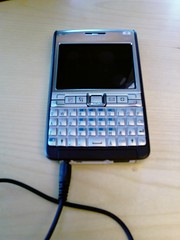 My new phone showed up today! Stay tuned for more information.
Thursday, April 26, 2007
Have to move on...
It feels like it was yesterday I bought the HTC TyTN. Of course it was not, it was back in November 2006 according to the archives in this very blog. Back then I threw out the Sony Ericsson M600 due to lack of support for MacOSX, and bad support for Linux too. Although I have been quite happy with the TyTN during these months, there are some issues of course.
First it is the OS. I have never had a phone in the past I need to reboot that often. Sorry Microsoft. In the past I just told everyone that you are bad, and that people should choose something else (Linux, MacOSX, Symbian, Whatever). Now that I have actually used a Windows Mobile for some months, I can put so more momentum into those statements. Sure, WM6 will fix all the problems. Right, I don't believe it. And there are no WM6 upgrade for TyTN out there yet. When the phone is working it is quite ok, though. Even though I can not get the Imap client to just show me subscribed folders, and the camera freeze quite often (easily fixed with a reboot...), I can read and send messages, receive and call contacts and listen to music, snapping photos (as you can see over at my photoblog) and browsing web quite well. So the TyTN is not that bad. And the full keyboard is a life saver, the best I have ever had on phone or pda so far. Based on all the nice things with the phone, I can actually live with the bad OS, and keep it.
It is the second problem that make me switching again. The hardware is not holding up much longer. Every other time I switch the phone out of standby now, the screen just goes white. Turning on and off again usually fix the problems, but from time to time I also need to pull out the keyboard and push it back in again. Then there are the keys on the front. Earlier I could scroll with the directional buttons and press the mid button to select. But this does not work so well any more. Some of the other keys have problems as well. I suspect the reason to be the connection between the bottom "keyboard" part and the upper "display" part. There must be some weakness in the design there. Maybe this can be fixed by sending the phone off to support, but in the long run I can't live with this stability. When I get a new phone probably check out what support can do for me - if they can fix the problem on the TyTN I'll probably keep it as a backup; and for use on HSDPA networks...
The big question is then - where should I go now? Back to the SE M600i is not an option, as it is still not supported very well on MacOSX. That throws out the rest of the SE smartphones as well. And I do not want a Microsoft WM5 or WM6 device. That rules out most of the other smartphones on the market, at least with a qwerty keyboard, which is one of my requirements. And as you all know, iPhone is not out yet. And it will not have a real keyboard anyway. But Nokia have something - the revised version E61i which has a full keyboard, all the connectivity I need but the HSDPA, which is not that important yet anyway, since it is in general not available. MacOSX support also seems to be quite ok for Nokia S60 phones, and there are ssh client software available.
I have therefore ordered a Nokia E61i today. As it is on stock, it should appear already tomorrow or on monday. A report will appear here shortly after that.
So long folks, take care.
First it is the OS. I have never had a phone in the past I need to reboot that often. Sorry Microsoft. In the past I just told everyone that you are bad, and that people should choose something else (Linux, MacOSX, Symbian, Whatever). Now that I have actually used a Windows Mobile for some months, I can put so more momentum into those statements. Sure, WM6 will fix all the problems. Right, I don't believe it. And there are no WM6 upgrade for TyTN out there yet. When the phone is working it is quite ok, though. Even though I can not get the Imap client to just show me subscribed folders, and the camera freeze quite often (easily fixed with a reboot...), I can read and send messages, receive and call contacts and listen to music, snapping photos (as you can see over at my photoblog) and browsing web quite well. So the TyTN is not that bad. And the full keyboard is a life saver, the best I have ever had on phone or pda so far. Based on all the nice things with the phone, I can actually live with the bad OS, and keep it.
It is the second problem that make me switching again. The hardware is not holding up much longer. Every other time I switch the phone out of standby now, the screen just goes white. Turning on and off again usually fix the problems, but from time to time I also need to pull out the keyboard and push it back in again. Then there are the keys on the front. Earlier I could scroll with the directional buttons and press the mid button to select. But this does not work so well any more. Some of the other keys have problems as well. I suspect the reason to be the connection between the bottom "keyboard" part and the upper "display" part. There must be some weakness in the design there. Maybe this can be fixed by sending the phone off to support, but in the long run I can't live with this stability. When I get a new phone probably check out what support can do for me - if they can fix the problem on the TyTN I'll probably keep it as a backup; and for use on HSDPA networks...
The big question is then - where should I go now? Back to the SE M600i is not an option, as it is still not supported very well on MacOSX. That throws out the rest of the SE smartphones as well. And I do not want a Microsoft WM5 or WM6 device. That rules out most of the other smartphones on the market, at least with a qwerty keyboard, which is one of my requirements. And as you all know, iPhone is not out yet. And it will not have a real keyboard anyway. But Nokia have something - the revised version E61i which has a full keyboard, all the connectivity I need but the HSDPA, which is not that important yet anyway, since it is in general not available. MacOSX support also seems to be quite ok for Nokia S60 phones, and there are ssh client software available.
I have therefore ordered a Nokia E61i today. As it is on stock, it should appear already tomorrow or on monday. A report will appear here shortly after that.
So long folks, take care.
Subscribe to:
Posts (Atom)